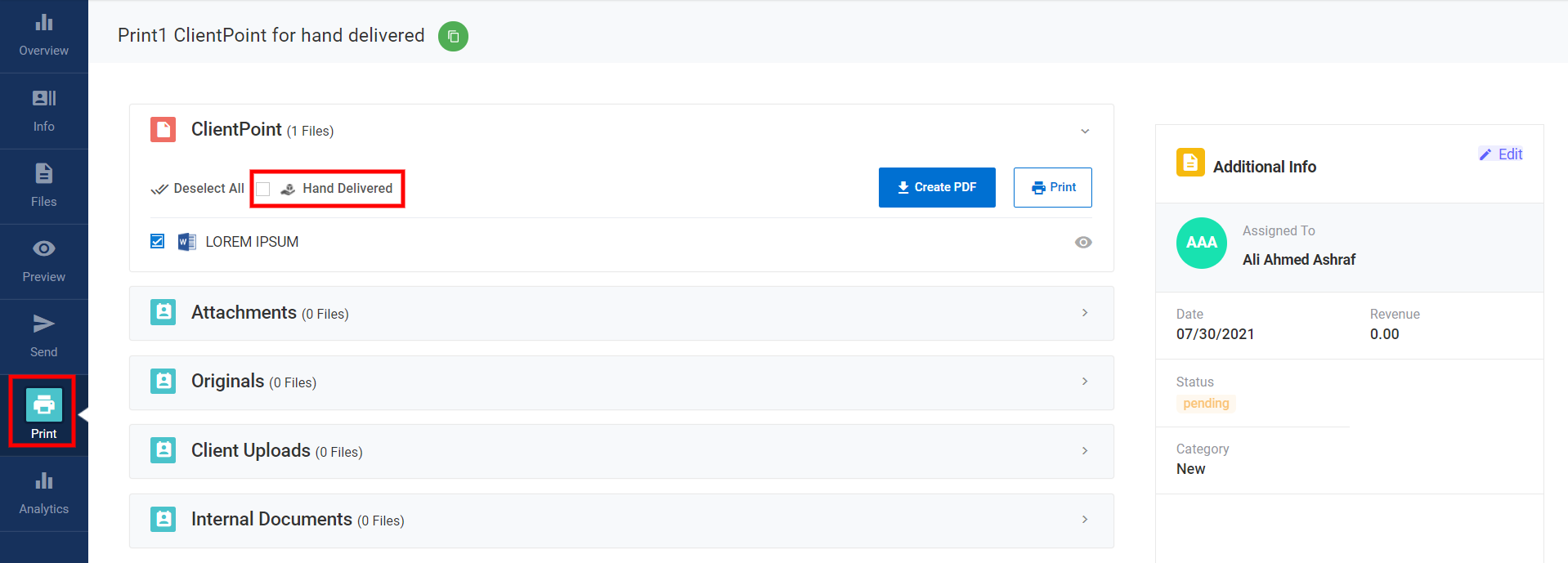
The Download and/or Print feature in ClientPoint provides flexibility in how ClientPoints and their associated documents can be accessed, shared, and stored. This feature allows users to download ClientPoints as PDFs or print hard copies, along with any attachments, internal documents, client uploads, or original files.
Key Features:
-
Download PDF/Print Hard Copy:
- Users can download a ClientPoint as a PDF or print a hard copy directly from the platform. This is particularly useful for providing a physical record of the ClientPoint for clients or internal use.
-
Signed ClientPoints can also be downloaded from the "Print" section, ensuring that signed documents are easily accessible for record-keeping or sharing.
-
Downloadable Files:
- Files marked as downloadable will appear under the Originals section. These can include Word documents, Excel spreadsheets, or any other base files, providing users with the original form of documents before any edits or changes are made.
-
Client Uploads: If the Client Uploads feature is enabled, any documents uploaded by the client will be available for download under the Client Uploads section.
-
Internal Documents: Any internal documents marked as downloadable can also be downloaded from the Print area.
-
Notifications:
- When a client uploads a document, the assigned Sales Rep will receive an email notification to keep them informed of any changes or additions made by the client.
-
Hand-Delivery Marking:
- If a ClientPoint is sent as a PDF or printed and physically delivered, it should be marked as "hand-delivered" for accurate tracking of delivery methods.
This functionality ensures that all files within a ClientPoint are easily accessible, whether for digital use or as hard copies, and allows for clear tracking of the delivery process.
For any questions or further assistance, please reach out to support@clientpoint.net.
